

New Enhanced Email Security Features in Microsoft 365
We are pleased to announce new advanced email/Office security features across our Microsoft Office suite. Starting November 1, all staff and students will see new features to protect your data and enhance your online safety. With the deployment of Microsoft Defender for Office, we are reinforcing our commitment to providing a secure digital environment for all members of our college community.
Here’s a brief overview of the new security features:
1. Quarantine Notifications – Daily Email
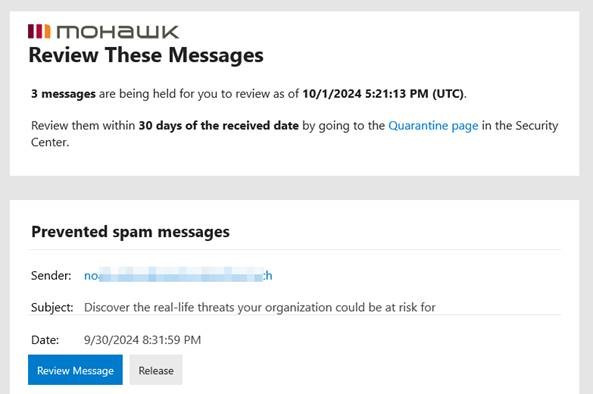
Suspicious emails and files will continue to be automatically placed in your Quarantine. This feature helps prevent potentially harmful content from reaching your inbox, giving our IT team the opportunity to review and manage any threats before they pose a risk to your device or data. Quarantine notifications will be delivered to your mailbox daily and will help facilitate more timely awareness of email messages that may have been captured unintentionally by the Quarantine. Upon reviewing the quarantined messages you will have the options to release the message as well as adding the sender to your Safe Senders list.
Sample Quarantine Email:
2. Safe Links
Microsoft Defender’s Safe Links feature checks the web links you receive in real-time, identifying and blocking any malicious URLs before you click and visit the dangerous website. This feature protects you from phishing attempts and websites that could compromise your personal information or your account credentials. Safe Links protects you from malicious links that are used in phishing and other attacks. Specifically, Safe Links provides URL scanning and rewriting of inbound email messages during mail flow, and time-of-click verification of URLs and links in email messages, Teams, and supported Office 365 apps. Safe Links scanning occurs in addition to regular anti-spam and anti-malware protection.
3. Safe Attachments
With Safe Attachments, every email attachment is scanned in a secure environment before it reaches your inbox. This additional layer of protection ensures that harmful attachments are neutralized, reducing the risk of malware or viruses affecting your computer. Safe Attachments in Microsoft Defender for Office provide an additional layer of protection for email attachments that have already been scanned by anti-malware protection in Exchange Online Protection. Specifically, Safe Attachments uses a virtual environment to check attachments in email messages before they're delivered to recipients (a process known as detonation).
Important: Keep Reporting SPAM/Junk & Phishing Emails
We encourage everyone to remain vigilant and report any suspicious emails directly from your mailbox or to the IT Service Desk immediately.
If you experience any issues with these new features, please contact the Service Desk at 905-575-2199.
Visit the ITS website to learn more about available services, resources, and submit or review ticket status on the IT Self Service Portal.